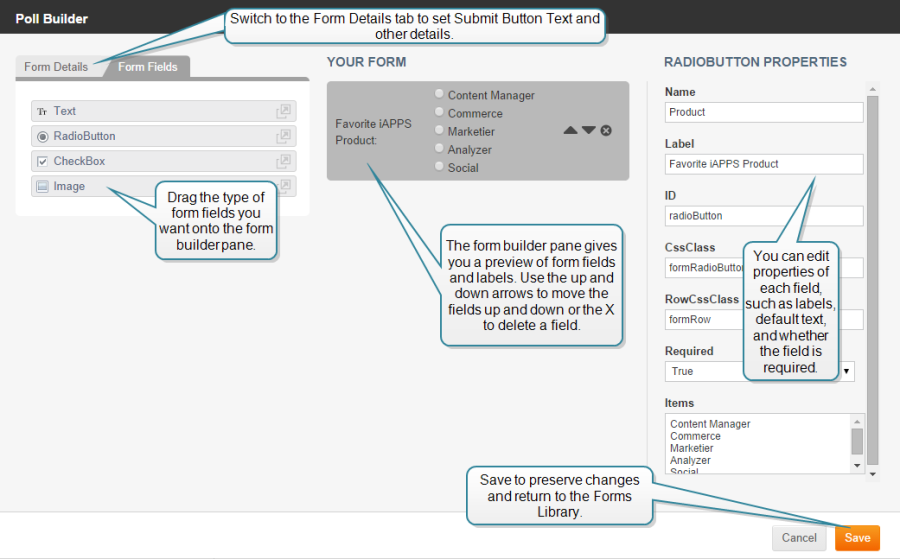
Designing the layout of a poll is very similar to designing a form, although there are not as many options.
To design a poll layout::
• Follow the step for creating a new poll (See "Adding / Editing a Poll and Poll Properties") or click on a poll in the Forms Library list and click the Edit button.
A Form Builder window appears displaying three columns:
 Adding Form Fields
To build a poll:
The Form Builder provides the Form Fields described in the following table:
| Form Field | Description |
|---|---|
| Text | A text area to display text information such as directions on how to fill out the poll. |
| RadioButton | Two option radio button list |
| CheckBox | Two option check box list. |
| Image | Area to display image. |
Drag any additional Form fields into the Form Builder pane to build your poll.
Before you finish with your form you need to specify Form Field Properties for each field in the form.
Specifying Form Field Properties
The properties specify names, labels and other aspects of the field’s behavior.
When you drag a field into the Form Builder pane, or click on a field already in the pane, properties for that field display in the Properties column. Not all fields have all the properties. What each property does is described below.
| Property | Applies to Form Field | Description |
|---|---|---|
| Name | All | Enter a non-displaying name by which you can reference this field. |
| Label | All Except: Text, Image. | Enter a label to appear beside this field that identifies the function of this field to the user. |
| ID | All | Enter a non-displaying ID by which you can reference this field. |
| CssClass | All | Style class |
| RowCssClass | All | Style class |
| Required | All Except: Text, Image, |
Specifies whether a user is required to specify input in this field. • Click arrow in pick-list to choose true (default) or false. • True = required. • False = not required. |
| Items | drop-down, RadioButton, CheckBox | Labels for options displayed in drop-down, RadioButton, or Checkbox. |
| Text | Heading | Text that displays in a bold font. |
| OnClick | Image | Action to execute when OnClick event gets triggered. |
| Src | Image | Path and filename of physical image file. |
| AltText | Image | Text to display when Browser cannot display image. |
Once you have finished with your form fields and specified their field properties you can save the poll by clicking Save.
You may want to go back and edit some of the Details for the poll itself. In that case, edit the form and click on the Form Details tab.
|
iAPPS is a product of Bridgeline Digital
|

